

Overview of Upcart Billing Policies
The Upcart Cart Drawer app follows Shopify’s standard billing practices. Charges are based on whether the app is installed, rather than how often it’s used or which features are active. This means billing continues as long as the app stays installed, even if you’re not currently using its features. Additionally, Upcart’s Growth plan uses a usage-based pricing model, where billing is calculated automatically based on your store’s monthly order volume. The Enterprise plan is a flat monthly rate instead. You might see charges in the following situations:- After your 14-day free trial ends, if the app is still installed.
- During Shopify’s billing cycle, if a charge was created before you uninstalled the app.
Free Trial
Upcart is free to use for the first 14 days. Your free trial starts on the day you first choose a plan and approve the Shopify charge, which normally happens right after you install the app. The clock runs from that first start date and does not reset: if you’ve installed and uninstalled Upcart before, accepting a plan again gives you only the days still left of the original 14, and none at all once 14 days have passed. Once the trial ends, your Shopify store will automatically be charged the subscription fee. To avoid charges, make sure to uninstall the app before your trial period ends. Billing begins as soon as the trial expires, even if you’re not actively using the app on your store. You do need to choose a plan and approve the Shopify charge before you can use Upcart. After installing, the app sends you to the plan-selection screen and keeps you there until a plan is accepted. Once approved, billing operates through Shopify’s billing infrastructure.Shopify Billing Cycles and Upcart Charges
Charges for Upcart are synchronized with Shopify’s standard billing cycle. This means that even if you uninstall the app, you may still see charges on your Shopify bill for the current billing period if they were generated before you uninstalled the app. Upcart offers two plans: Growth, priced by order volume, and Enterprise, a flat rate at any volume. The tiers below are the Growth plan. Each store within a multi-store account is billed individually based on its own order volume, without linkage to other stores in the account.
The Enterprise plan is a flat $299.00/month with no usage fees at any order volume.
Note: Store orders refer to how many total orders you have on your Shopify store each month, not orders that are generated by the app. This means that your bill may increase or decrease based on your order volume each month.
Upcart Usage Price
This section describes the Growth plan. The Enterprise plan is a flat $299.00/month and never incurs usage charges. On Growth, Upcart costs a flat $29.99 USD per month for stores with 200 orders or fewer. Above 200 orders you also see a single usage charge. That charge is not per extra order — it is a fixed amount for the tier your store’s total monthly order count falls into: $5 for 201–500 orders, $25 for 501–1,000, $60 for 1,001–2,000, $90 for 2,001–3,000, $120 for 3,001–5,000, and $169.99 above 5,000. Crossing into a tier changes the whole charge, so the totals in the table above are what you pay. This billing structure is integrated seamlessly into Shopify’s platform, ensuring that billing and usage calculations are automated without requiring any additional user input. For example, if your monthly bill includes a $29.99 subscription fee and a $5 usage charge, your total would be $34.99. Based on the pricing tiers, this means your store had between 201–500 orders that month. For stores with over 5,000 orders per month, the total charge is $199.98 — the $29.99 subscription plus a $169.99 usage charge — which reflects the highest pricing tier. Note: If you have more than 200 orders, the subscription and usage charges will appear as separate line items on your Shopify invoice but will always add up to a single total price.Frequently Asked Questions
How is the billing period determined?
Charges are prorated for the next 30-day period. For example, if a charge is dated 04/01/2025, it applies to the billing period from 04/01/2025 to 05/01/2025. This means charges are calculated based on your store’s order volume for the previous 30 days. The prorated billing approach allows for a simpler and more affordable billing structure.How do I change my plan?
You can upgrade or downgrade your plan directly in the app without contacting support. From the Upcart home page, click Plan & billing in the header. Your current plan is marked, and you can select a different plan to switch. The new charge will appear in your Shopify billing history.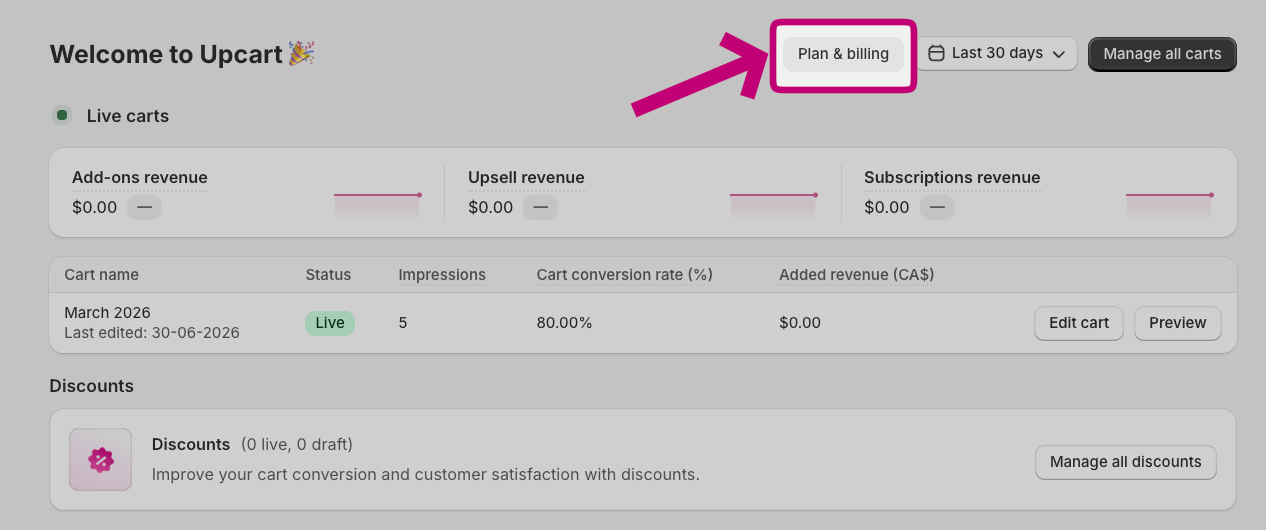
How do I prevent charges?
To avoid unexpected charges:- Uninstall the app before the 14-day free trial expires.
- Confirm that the app is completely removed from your Shopify account.
- Regularly review your Shopify billing statements for pending charges.