

Overview
Upcart includes a Traffic Allocation Percentage slider that lets you define what portion of store visitors will see the cart drawer.- 100% (default): All customers see Upcart.
- 50%: Only half of customers see it.
- 0%: Upcart is disabled for all customers.
How It Works
When a customer visits your store for the first time, Upcart generates a random value to determine whether they should see the cart. The value is saved in their browser’s local storage — deliberately, so a shopper who sees the cart one day doesn’t lose it the next. Because it’s local storage rather than a cookie, clearing cookies alone won’t reset it. The customer would need to clear the site’s local storage, or use a private window.Behavior in Preview Mode
Preview links from the Cart Editor and the Carts page skip traffic allocation entirely — the cart is force-enabled so you always see it, whatever your allocation percentage is set to. That means a preview can’t show you the disabled side of the split. To check what an excluded shopper sees, visit your storefront normally in a browser whose local storage hasn’t been assigned yet (a private window works).How to Adjust Traffic Allocation
- Navigate to Settings in the Upcart Cart Editor.
- Use the Traffic Allocation Percent slider to set the desired percentage.
- Click Save to apply your changes.
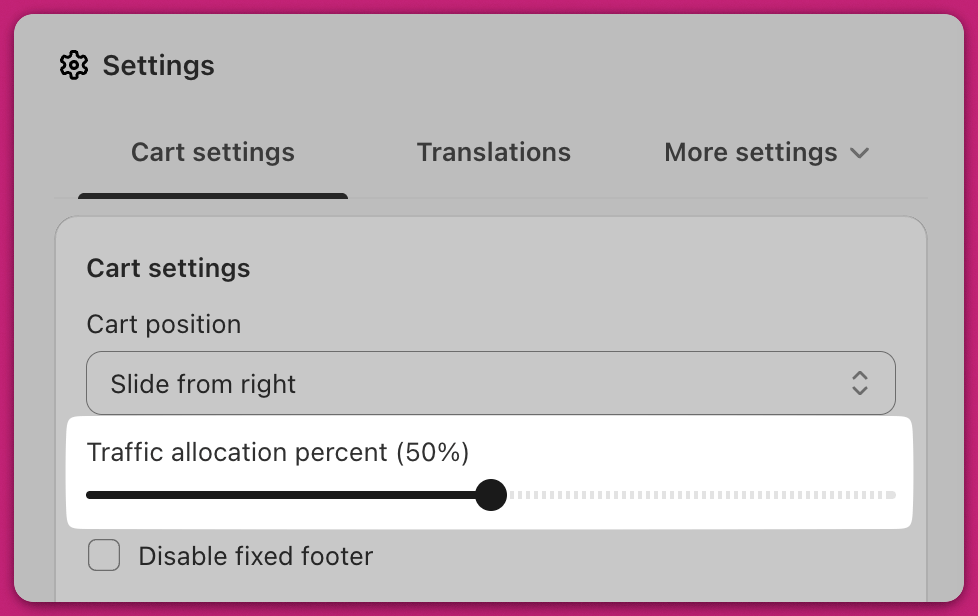
Example:
- Set to 75%: 3 out of every 4 new visitors will see Upcart.
- Set to 0%: Useful for temporary disablement without uninstalling the app.