Payment Capture
If your store is using Manual Payment Capture, you may be seeing some orders in a partially paid status. This article will show you how to resolve this issue while retaining your Manual Payment Capture settings.
Why This Happens
If your store is using a fraud detection app (e.g. NoFraud or Riskified), the fraud detection app might not natively support post-purchase upsells. In these cases it will often capture payment for the order too early, before the post-purchase upsell is added. The post-purchase upsell payment will be authorized, but only the initial payment would be captured. Such an order would be shown as Partially paid.
Additionally, the timing of the fraud app’s payment capture can interfere with Aftersell’s item cleanup logic. If the fraud app captures the original payment after the upsell authorization fails, Aftersell may not remove the unpaid upsell item from the order as expected. This can result in customers receiving free product.
How to Fix It
First, you’ll need to confirm that you’re currently on Manual Payment Capture. If you aren’t, then unfortunately the rest of this article won’t apply to you.
Confirm Your Payment Capture Settings
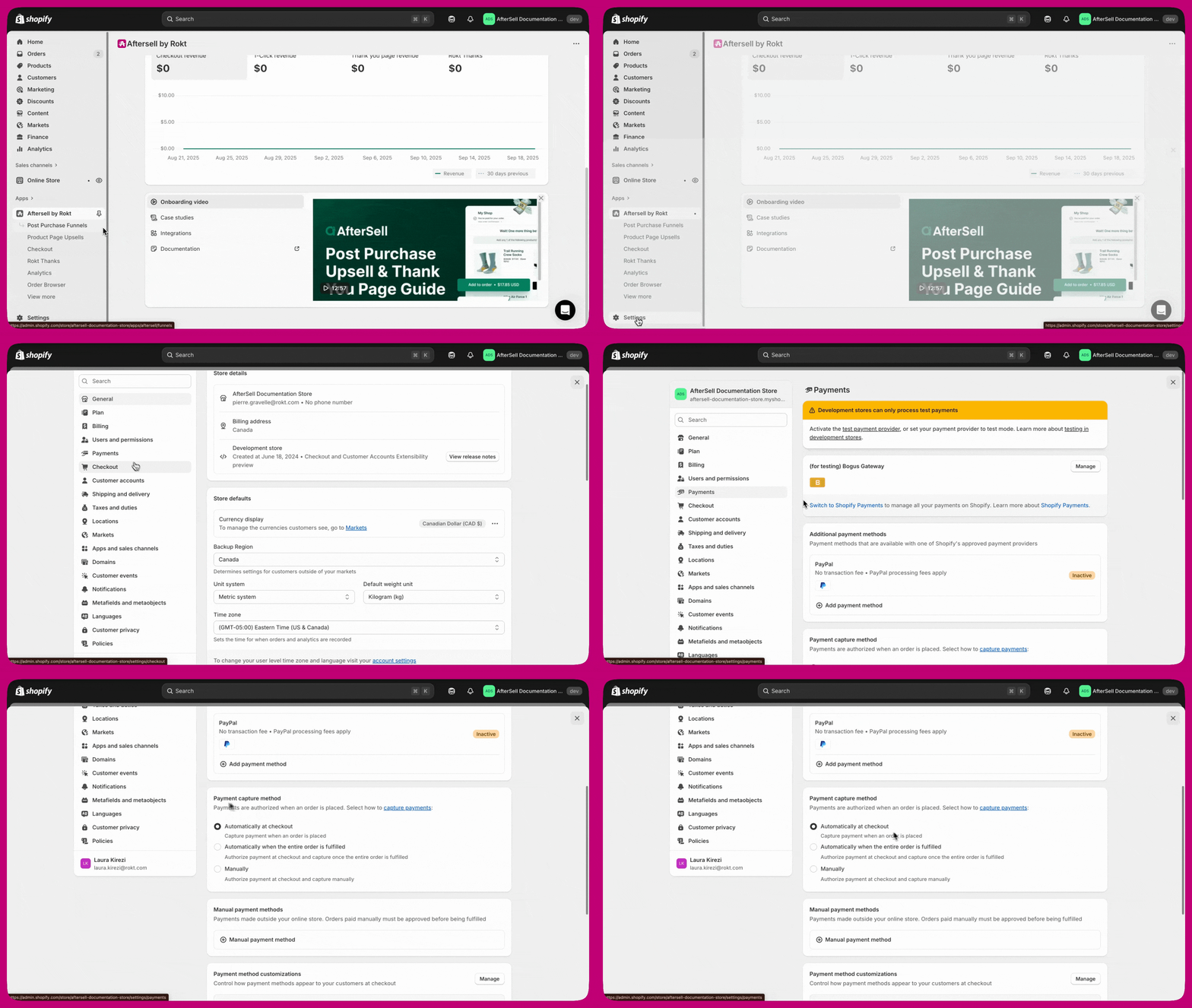
Your store may have an automatic payment capture system set up, yet still have the Shopify Manual Payment Capture setting enabled. You can confirm your store’s payment capture settings:
Shopify Admin > Settings > Payments > Payment Capture Method
If you’re currently on Manual Payment Capture, continue reading!
Creating a Shopify Flow
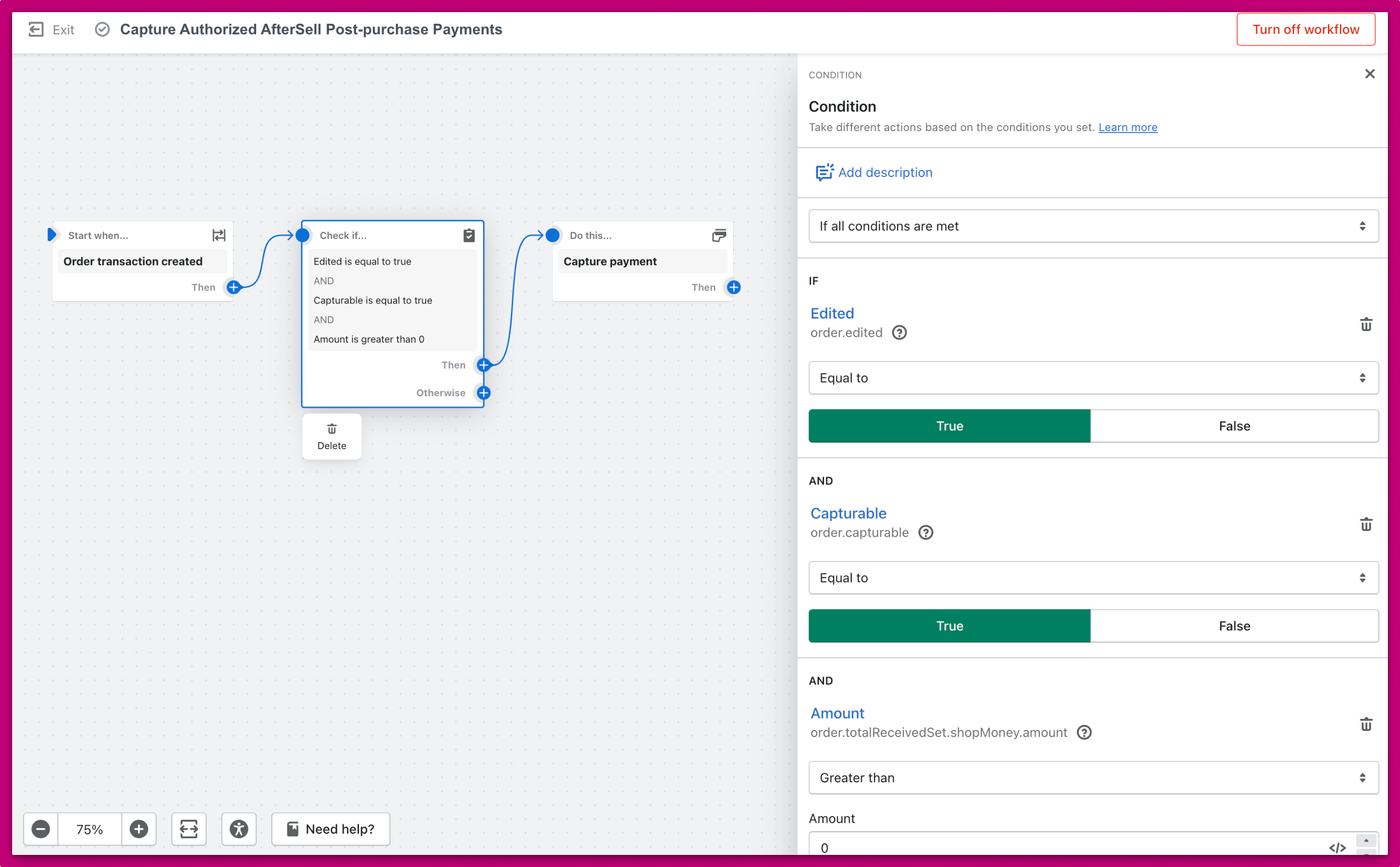
The simplest solution to ensure that all payments for an order are captured is to use a Shopify Flow. Below is an image of a Shopify Flow that achieves this:
Explaining the Flow
This flow has 3 steps:
- A Trigger is put in place to ensure you only start the flow when an order transaction has been created. The first transaction for an order is created when the customer places the order. An additional transaction is created if the customer accepts the Aftersell post-purchase upsell. Our goal is to capture payment on the second transaction, so we will check some conditions in the next step.
- Conditions are put in place to ensure the flow only continues in certain scenarios. We only want this flow to continue if the transaction that was created is from a post-purchase upsell. We also don’t want to run this flow if payment for the original order hasn’t been captured yet. This flow is only supposed to capture additional payment that was missed. If there hasn’t been any payment captured yet, then we will do nothing in this flow and assume that the regular payment capturing system will capture the full amount.
- Capture payment once all of your checks have passed. This will capture the payment only for the extra amount from the post-purchase upsell. Problem solved!
After implementing the flow above, if you are using external fulfillment services please ensure that the payment capture Flow doesn’t have unintended effects on your fulfillment. For more details on fulfillment, please see our Fulfillment Documentation.
Post-Purchase Upsell Payment Capture Not Working
<Note>
This section applies if you are experiencing a recent spike in Partially paid orders specifically on post-purchase upsells, even if you do not use a fraud detection app.
</Note>
What Changed
Shopify updated their built-in automation template “Capture payment if order is not high fraud risk” around March 31, 2026. This update changed how Shopify evaluates fraud risk on order edits, which broke the automatic payment capture for post-purchase upsells.
Previously, Shopify would re-run fraud analysis when an order was edited (such as when a post-purchase upsell item was added). This risk-level change would re-trigger the payment capture template flow, capturing the upsell payment. Shopify no longer re-runs fraud analysis on order edits, so the template flow does not re-trigger and the upsell payment is not captured.
This issue affects stores with or without a fraud detection app.
Symptoms
You may be experiencing this issue if:
- You have noticed a sudden spike in Partially paid orders on post-purchase upsells
- Only orders where a customer accepted a post-purchase upsell are showing as Partially paid
- Payment for the original order is captured, but the upsell payment is authorized and not captured
- You did not change anything in your store settings around the time the issue started
How to Fix It
Use the Aftersell Flow template for a one-click setup. Aftersell publishes a pre-built Flow template called “Capture payment when a post-purchase upsell is accepted” in Shopify’s Flow template library. You can install it directly from the Flow app without building the workflow manually. Search for it in the Flow template library under the Orders category.
- Trigger: “Aftersell Post Purchase Offer Accepted” - This fires when a customer accepts an Aftersell post-purchase upsell offer and the item is successfully added to the order.
- Condition: “Order capturable is equal to True” - This ensures the flow only attempts to capture payment when the order is in a state where capture is possible.
- Action: “Capture payment” - If the condition is true, the flow captures the outstanding payment for the upsell amount.
<Warning>
Do not add a presentment money amount condition. Some stores have experienced issues where Shopify incorrectly returns the presentment money amount as 0, even when there is an outstanding balance. Adding a condition like “presentment money amount is greater than 0” can cause the flow to skip payment capture on valid orders. This can result in customers receiving invoice emails instead of having their payment captured automatically. Keep the flow simple: trigger, capturable check, capture payment.
</Warning>
<Info>
Your existing Shopify automation for capturing payment on the original order can stay as-is. This new flow runs alongside it and only handles the post-purchase upsell payment.
</Info>
After Setting Up the Flow
- Test the flow on a development or sandbox store before enabling it in production.
- Monitor your orders for a few days after enabling the flow to confirm payments are being captured as expected and no invoice emails are being sent to customers.
- Check your fulfillment workflow. If you use external fulfillment services, make sure this payment capture flow does not trigger fulfillment before you are ready. For more details, see our Fulfillment Documentation.
- Review your order hold settings. If you have had orders ship without completed payment, confirm your order hold settings are configured to prevent fulfillment until payment is fully captured.
Summary
Frequently Asked Questions
I don’t use a fraud app. Why are my post-purchase upsell payments not being captured?
Shopify updated their built-in “Capture payment if order is not high fraud risk” automation template around March 31, 2026. Previously, Shopify would re-run fraud analysis when an order was edited (like when a post-purchase upsell was added), which re-triggered the payment capture flow. Shopify no longer does this, so the upsell payment is not captured. Creating the “Aftersell Post Purchase Offer Accepted” Shopify Flow described above will resolve this issue.
Will the new flow capture the full order amount or just the upsell amount?
The flow only captures the outstanding upsell amount. It does not re-capture or double-capture the original order payment.
What happens if the order is not capturable when the flow runs?
The flow checks the “Order capturable” condition first. If the order is already capturable it captures straight away.
If it is not, the Aftersell template does not give up immediately: it waits 60 seconds, checks Order capturable a second time, and captures if the order has become capturable in the meantime. Only if it is still not capturable does the run end, with the message “Order did not become capturable in time” — no capture is attempted too early either way.
A hand-built flow with only the single condition stops at the first check instead of retrying.
I already have a Shopify automation for capturing payment. Do I need to change it?
No. Your existing Shopify automation (such as “Capture payment if order is not high fraud risk”) can stay as-is. The new Shopify Flow runs alongside it and specifically handles the post-purchase upsell payment gap.
My customers are receiving invoice emails after accepting a post-purchase upsell. What is happening?
This can happen if the Shopify Flow includes a presentment money amount condition. Shopify sometimes returns the presentment money amount as 0 even when there is an outstanding balance. When this happens, the flow skips payment capture, and Shopify sends an invoice email to the customer instead. The fix is to remove the presentment money condition from the flow and keep only the “Order capturable” check.
I use Riskified / NoFraud and my customers are getting free product from upsells. What is happening?
When a customer accepts a post-purchase upsell but the upsell payment authorization fails, Aftersell should remove the unpaid item from the order after a set amount of time (configured in Aftersell > Settings > Fulfillment and Payment > Partially Paid). However, if your fraud app captures the original payment at a specific point in the sequence, it can interfere with Aftersell’s cleanup logic, causing the unpaid item to stay on the order and get fulfilled for free. The Shopify Flow fix above will help by ensuring payment is captured promptly. You should also review your Partially Paid auto-removal settings and your order hold settings to prevent fulfillment before payment is confirmed.
Is Aftersell involved in payment capture?
No. Aftersell is not involved in payment authorization or capture. Aftersell tells Shopify to add the upsell product to the order via Shopify’s post-purchase API. Shopify handles the rest of the payment process. The Shopify Flows described in this article are the recommended way to ensure payment is captured.
Where can I learn more about Partially paid orders?
See our Partially Paid Orders article for details on what causes Partially paid orders and how to resolve them.