Aftersell & Upcart Docs home page
Aftersell
Search...
⌘K
General Information
General
Billing
FAQs
Post Purchase Upsell
Post‑Purchase Widgets
Subscriptions in Post-Purchase offers
Translating Post-Purchase Funnels
Understanding Conditional Logic for Post-Purchase Triggers
Getting Started
Configuring 1-Click Upsells
Advanced
Checkout Editing
General
Adding Widgets to Checkout
Adding a Checkout Widget to Your Shopify Checkout
Checkout Widget Types
Creating Your First Checkout Widget
Show Checkout Widgets in Shop Pay
Rokt Thanks
General
Configuring Rokt Thanks
Frequently Asked Questions
Thank You Page
How Can I Set Up and Customize Thank You Page Upsells in Aftersell?
Thank You Page (Extensions) Overview
Thank You Page (Scripts) Overview
Troubleshooting
Checkout Troubleshooting
1-Click Upsell Troubleshooting
Thank You Page Troubleshooting
General Troubleshooting
Integrations
Aftersell & Inveterate Integration
Aftersell & Nosto Integration
Aftersell & Rivo Integration
Aftersell & Skio Integration
Aftersell & Stay.Ai Integration
Aftersell & Yotpo Reviews Integration
Analytics
Analytics in Aftersell
DTC Ads
DTC Ads Onboarding Guide | Web Pixel Activation
Product Page upsells
Product Page Upsells
Aftersell Website
Upcart Website
Aftersell & Upcart Docs home page
Aftersell
Search...
⌘K
Ask AI
Aftersell Website
Upcart Website
Search...
Navigation
Adding Widgets to Checkout
Show Checkout Widgets in Shop Pay
Checkout Editing
Adding Widgets to Checkout
Show Checkout Widgets in Shop Pay
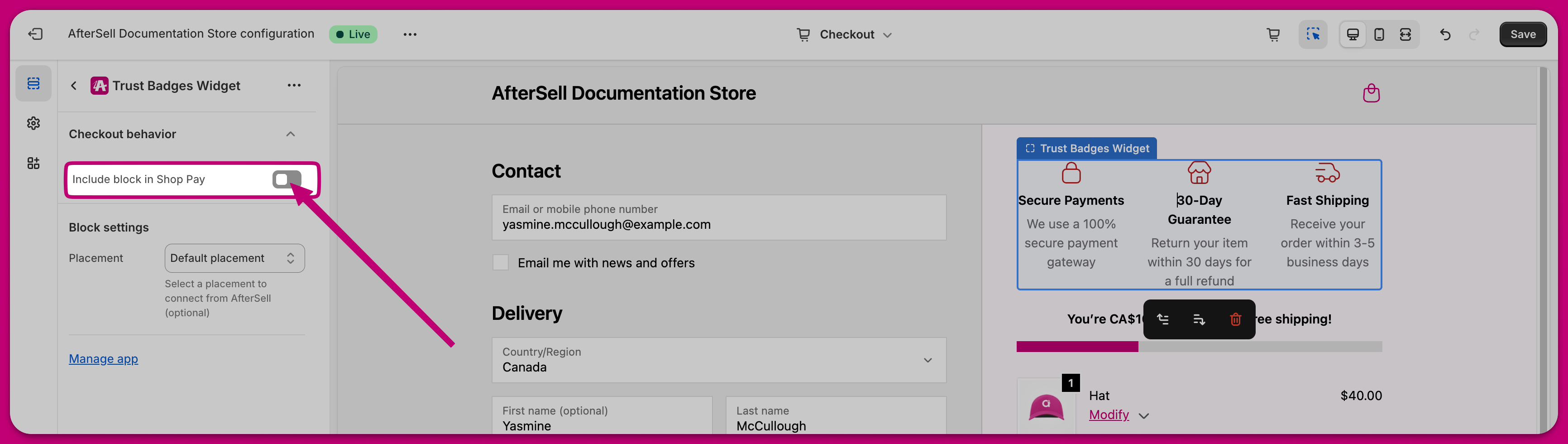
To have your checkout widgets display in Shop Pay, you must enable the “Include app block in Shop Pay” option under the “Checkout behaviour” dropdown.
If you have not set up checkout widgets yet, you can
follow this guide to learn how to add checkout widgets to your checkout
.
Was this page helpful?
Yes
No
Previous
What is Rokt Thanks?
An overview of Rokt Thanks and how it can help generate additional profit
Next
⌘I