

Overview
If clicking “Add to Cart” on your storefront sends customers to the Shopify cart page instead of opening the Upcart drawer, it’s usually due to a simple configuration issue. This guide walks through the most common causes and how to resolve them.Common causes
The cart redirect is usually triggered by one of the following:- Upcart settings – certain compatibility settings may be disabled
- Theme settings – the theme may force a redirect by default
- App conflicts – another app could be controlling the cart behavior
Step-by-step troubleshooting
Follow these steps in order. Test the cart after each step to check if the issue is resolved.1. Check your Upcart settings
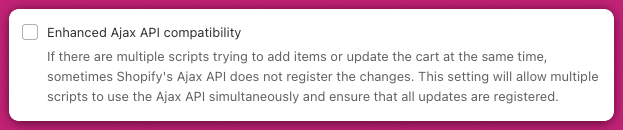
Go to Upcart > Cart Editor > Settings > Cart settings, then expand Advanced Settings. Make sure Enhanced Ajax API compatibility is off. Only leave it on if your store genuinely needs it (several scripts writing to Shopify’s Ajax cart at once). In that case, register your add-to-cart buttons with Upcart explicitly usingupcartRegisterAddToCart so the drawer still opens.
For complete guidance on this setting, see Enhanced Ajax API compatibility.
2. Check your Shopify theme settings
Go to:Shopify Admin > Online Store > Themes > Customize > Theme Settings > Products Look for the setting labeled “Enable cart redirection” and turn it off.
This setting, when enabled, automatically redirects customers to the cart page after clicking Add to Cart, bypassing Upcart entirely.
3. Review other installed apps
Some apps like ReCharge, WideBundle, Bold, or CartKit may override cart behavior. In each app’s settings:- Look for a toggle like “Redirect to Cart” or “Go to Cart After Add”
- Change it to Stay on Page or Do Nothing
Testing as you go
After each fix:- Add a product to your cart
- Confirm whether Upcart opens the drawer or if you’re still redirected
- Only move to the next step if the issue persists
If it’s still not working
If you’ve completed all steps above and Upcart still doesn’t open, try the following:Switch to a default theme
- Temporarily enable a Shopify base theme like Dawn
- Activate Upcart and test the Add to Cart behavior
- If it works in Dawn but not in your current theme, the issue is theme-related
Disable other cart-related apps one by one
Turn off one app at a time and test the cart each time. If Upcart works after disabling a specific app, you’ve identified the conflict.Use browser developer tools
- Press F12 (or right-click → Inspect)
- Go to the Console and Network tabs
- Look for error messages or failed script loads (especially from
add.js) - Check if another app’s script is overriding or hijacking the Add to Cart behavior
When to contact support
If the issue persists after completing all steps, gather the following before reaching out:- Your current theme name and version
- A list of cart-related apps you’re using
- Any error messages from your browser console
Summary
This issue is almost always caused by one of three things:- A theme or app is forcing cart redirects
- Upcart’s compatibility setting is off
- Another script is hijacking the add-to-cart behavior